

Phishing remains one of the most persistent cybersecurity threats facing organizations. Despite years of awareness campaigns, email filtering, multifactor authentication and advanced endpoint security, attackers continue to exploit one weakness that technology cannot completely eliminate: human trust.
A convincing message does not necessarily require sophisticated malware or the compromise of a legitimate corporate domain. In many cases, an attacker only needs a domain name that looks familiar enough to escape attention for a few seconds.
That is where typosquatting becomes particularly dangerous.
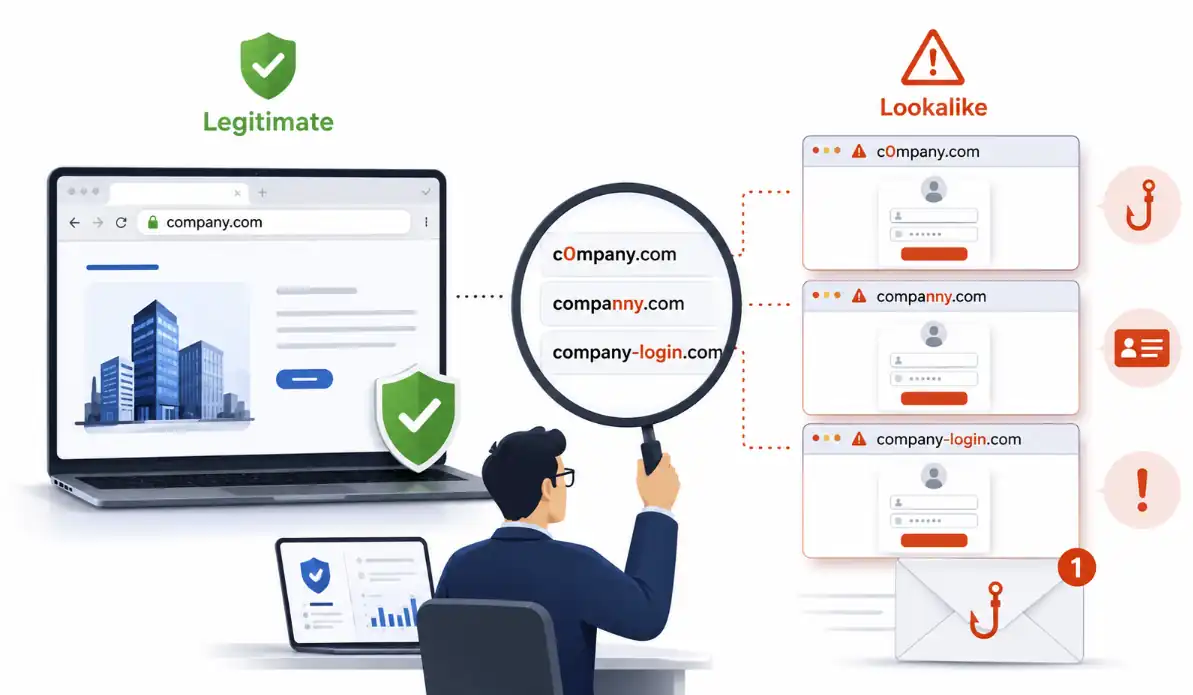
A single missing letter, substituted character, additional hyphen or visually similar symbol can transform a legitimate company name into convincing phishing infrastructure. The difference may be obvious to a security analyst examining the domain carefully, but much less obvious to an employee reading an urgent email on a smartphone.
Understanding and detecting these domains should therefore be part of a broader phishing-defense strategy.
Phishing Is Fundamentally an Attack on Trust
Phishing is often discussed as an email-security problem. In reality, phishing is better understood as a trust-manipulation problem.
The attacker creates a situation in which the victim believes that a request, identity or destination is legitimate. The technical mechanism may be an email, SMS message, QR code, social media message or fraudulent website, but the underlying objective remains the same: convince the victim to trust something that should not be trusted.
Modern phishing campaigns can be highly targeted.
An employee may receive what appears to be an invoice from a known supplier. A service desk analyst may receive a password-reset request. A finance department may be contacted by what appears to be a senior executive. A candidate may receive a fake recruitment message. A customer may be directed to what looks like the organization’s normal login portal.
In these situations, the domain name is frequently one of the attacker’s most important assets.
The real company does not need to be technically compromised. Instead, the attacker creates a parallel identity that is visually close enough to the legitimate one.
The Domain Name as a Social Engineering Weapon
Consider a hypothetical company using:
example.com
An attacker could attempt to register domains such as:
exampl.com
examp1e.com
ex-ample.com
example-login.com
To a trained security professional, these differences may appear trivial. To someone processing hundreds of messages every week, working under pressure or checking email on a small screen, the difference can easily be missed.
This is one reason why typosquatting remains effective.
The attacker is not trying to defeat DNS security or compromise the legitimate domain. The attacker simply controls another domain.
That domain can have working DNS records. It can resolve to a real web server. It may have a valid TLS certificate. It may be configured with MX records and used to send or receive email.
From a purely technical perspective, many components of the infrastructure may appear completely valid.
The deception is in the name.
This distinction is important because users are often told to look for HTTPS or the padlock symbol. However, encryption only protects communication between the user and the server controlling the domain. It does not prove that the organization behind that domain is trustworthy. A phishing site can also use HTTPS .
Example with Video using CyberRiskevaluator.com to Detect fake Domains
What Exactly Is Typosquatting?
Typosquatting is the registration or use of a domain designed to resemble another legitimate domain. Some variations imitate genuine typing mistakes. Others are deliberately engineered to create visual similarity. Common techniques include several categories.
Character substitution
A letter is replaced with another character that looks similar or appears plausible.
For example, the letter o may be replaced by the number 0, or the letter l by the number 1.
Character omission
One character is removed from the legitimate domain.
The result may remain visually convincing, particularly when the original brand name is relatively long.
Character insertion
An additional character is added. This may involve duplicating an existing letter or inserting another character at a position that is difficult to notice.
Character transposition
Two adjacent letters are exchanged.
These variants are particularly relevant because they imitate normal typing errors.
Keyboard-adjacent substitution
A character is replaced with another key located nearby on a keyboard.
Again, this can look like a legitimate user mistake while providing an attacker with a separate domain.
Hyphenation and word combinations
Attackers may insert hyphens or combine the company name with words such as:
login, secure, support, account, portal, verification or invoice.
Strictly speaking, these are not always classic typing errors. However, from a phishing-detection perspective, they belong to the same broader problem: domains designed to borrow trust from a legitimate brand.
Homoglyph attacks
More advanced attacks can use characters that visually resemble familiar Latin characters. Depending on the character set and domain representation, a user may see a name that looks very close to the legitimate brand even though the underlying characters are different.
These techniques demonstrate why simple string comparison is not sufficient for comprehensive domain monitoring.
From Domain Registration to Phishing Infrastructure
Finding a similar domain does not automatically mean finding a malicious domain.
This is one of the most important principles in typosquatting analysis.
A similar domain may have been registered defensively by the legitimate organization. It may belong to another company. It may be parked, inactive or associated with a legitimate product that happens to have a similar name.
Therefore, the objective of typosquatting detection is not to produce a binary statement:
similar domain = malicious
The correct objective is:
discover, prioritize and investigate.
A registered lookalike domain becomes more interesting when additional indicators appear.
For example:
- the domain was registered recently;
- MX records are configured;
- the website contains the target company’s brand name;
- the page title imitates a corporate login portal;
- an email or password field is present;
- the domain redirects to suspicious infrastructure;
- the domain appears in phishing or malware intelligence;
- certificate evidence suggests preparation for HTTPS hosting.
No single indicator necessarily proves malicious intent. The strength comes from combining evidence.
Detecting Lookalike Domains Before an Incident
This is where automated evaluation becomes valuable.
Manually imagining every possible variation of an important corporate domain is impractical. Even a relatively short domain can produce a surprisingly large number of plausible variations when substitutions, omissions, insertions, transpositions, keyboard mistakes and visual similarities are considered.
A practical detection process therefore begins by generating realistic permutations of the protected domain.
The next question is simple:
Which of these candidate domains actually exist?
Registration-status checks can dramatically reduce the investigation space. Instead of manually investigating hundreds or thousands of theoretical permutations, analysts can focus on the candidates that appear to be registered.
Modern registration analysis can use RDAP, the Registration Data Access Protocol, which provides structured registration information suitable for automated analysis.
The important point is that registration is a discovery signal, not a verdict.
An existing domain deserves investigation. It does not automatically deserve blocking.
The CRE Typosquatting Domain Evaluator
To make this analysis more accessible, the Cyber Risk Evaluator, or CRE, has introduced a dedicated Typosquatting Domain Evaluator.
The module is designed around a practical defensive workflow.
A user starts with the legitimate domain that should be protected. CRE then generates realistic lookalike variations based on common typo and impersonation techniques and checks the resulting candidates for registration status.
This allows a security professional to move quickly from a known corporate domain to a focused list of potentially relevant lookalike domains.
The basic workflow is straightforward:
Start with the legitimate domain.
The organization enters a corporate domain, customer-facing brand, authentication portal or other important domain that could be attractive to attackers.
Generate realistic variations.
The evaluator creates candidates based on substitutions, omissions, insertions, transpositions and other lookalike techniques.
Check registration status.
Generated domains are evaluated to identify candidates that appear to be registered.
Prioritize the findings.
Registered lookalike domains can then be investigated using additional context and technical evidence.
The objective is not to replace security analysts or threat intelligence platforms. Instead, it is to provide a fast starting point for investigating domain impersonation and potential phishing infrastructure.
What Should a Security Analyst Check Next?
Finding a registered lookalike domain is the beginning of the investigation, not the end.
A useful analysis should examine several dimensions.
Similarity to the protected brand
How close is the suspicious domain to the legitimate one?
A single-character substitution in a short and distinctive company name may deserve greater attention than a weak similarity involving a generic word.
Registration age
A newly registered lookalike domain can be more concerning, particularly when it appears shortly before an important corporate event, product launch, payment cycle, acquisition announcement or other business activity that attackers could exploit.
Age alone, however, is not proof of malicious intent.
DNS configuration
Does the domain resolve to an IP address?
Are MX records configured?
A domain prepared for email can present a different risk from a completely inactive registration. Nevertheless, defenders should remember that infrastructure can be activated later.
Web content
Does the domain host a website?
Does the page mention the target company or its products?
Does it contain login terminology, forms, password fields or email-address fields?
These signals can significantly increase the relevance of a finding.
Redirect behavior
Some suspicious domains do not directly host the final phishing page. They redirect users through one or more destinations.
Understanding the redirect chain can therefore reveal infrastructure and relationships that are not immediately visible from the original URL.
TLS certificate evidence
Certificate information can help determine whether a domain has been prepared for HTTPS.
However, a valid certificate should never be interpreted as evidence of trustworthiness. It shows that the entity controlling the domain successfully completed the certificate process; it does not validate the legitimacy of the business or website.
Threat intelligence
Finally, analysts should compare the domain against available reputation services, phishing feeds, malware intelligence and internal telemetry.
It is equally important to remember that a newly created phishing domain may not yet appear on public blocklists. Absence from a reputation database does not necessarily mean that the domain is safe.
The Challenge of Dormant Domains
One particularly difficult aspect of typosquatting detection is timing.
Attack infrastructure is not always activated immediately after registration.
A domain may be registered and left inactive for days, weeks or longer. The attacker can later configure DNS records, activate email services or deploy a phishing page shortly before launching a campaign.
This creates an important defensive lesson.
Security monitoring should not focus exclusively on domains that are already hosting obviously malicious content.
Registration itself can be an early-warning signal.
The closer the domain is to a protected brand, and the more sensitive the brand’s business context, the more valuable early visibility becomes.
For example, organizations involved in financial transactions, customer authentication, supplier payments or executive communications have strong reasons to monitor domains resembling their critical identities.
Typosquatting Detection Is Part of Layered Phishing Defense
No single control can solve phishing.
Secure email gateways can filter malicious messages, but attackers adapt.
DMARC, DKIM and SPF are essential elements of email security, but they do not prevent an attacker from registering and correctly configuring a separate lookalike domain.
Multifactor authentication significantly improves account protection, but some modern phishing techniques attempt to capture authenticated sessions or trick users into approving fraudulent actions.
Awareness training remains essential, but expecting every employee to detect every one-character domain variation is unrealistic.
Therefore, domain monitoring belongs within a layered defensive model.
A mature approach combines:
email security, domain impersonation monitoring, authentication security, user awareness, browser protection, threat intelligence, incident response readiness and rapid domain investigation.
Typosquatting analysis adds an important external perspective. It helps defenders observe infrastructure that may be preparing to target the organization before the attack reaches the inbox.
From Reactive Phishing Response to Early Detection
Many organizations still discover lookalike domains only after someone reports a phishing email.
At that point, the attack campaign may already be active.The domain has been registered. The phishing page has been deployed. Messages have been sent. Users may already have entered credentials. A more proactive approach asks a different question:
What infrastructure could be preparing to impersonate us?
That shift is strategically important. It does not eliminate phishing, but it improves the defender’s chances of identifying suspicious infrastructure earlier.
A practical process can be built around a simple cycle:
Generate. Check. Prioritize. Investigate. Monitor.
Generate realistic domain variations.Check which candidates exist. Prioritize them using technical and contextual signals.Investigate the most relevant findings.
Repeat the process because new domains are continuously registered.
Tools such as the CRE Typosquatting Domain Evaluator can support the first stages of this workflow by reducing the gap between theoretical domain impersonation risk and practical investigation.
Conclusion: One Character Can Be Enough
Phishing does not always begin with sophisticated malware, a zero-day vulnerability or the compromise of corporate infrastructure.
Sometimes it begins with one character. A missing letter. A number replacing a letter. Two characters in the wrong order.
A convincing word such as secure, login or invoice placed next to a trusted brand.
That small change can create an entirely separate infrastructure controlled by an attacker and used for credential theft, business email compromise, fraudulent payments, malware delivery or brand impersonation.
For security leaders, the lesson is clear: phishing defense should extend beyond the inbox.
Monitoring the domain ecosystem around important corporate identities can provide valuable early warning and help security teams investigate potential impersonation before a convincing lookalike domain becomes a successful attack.
The new Typosquatting Domain Evaluator in Cyber Risk Evaluator (CRE) provides a practical way to begin this process: identify realistic domain variations, discover which ones are registered and focus investigation where it matters most.
In cybersecurity, trust is frequently attacked through small details. And in typosquatting, one small detail can make all the difference.