

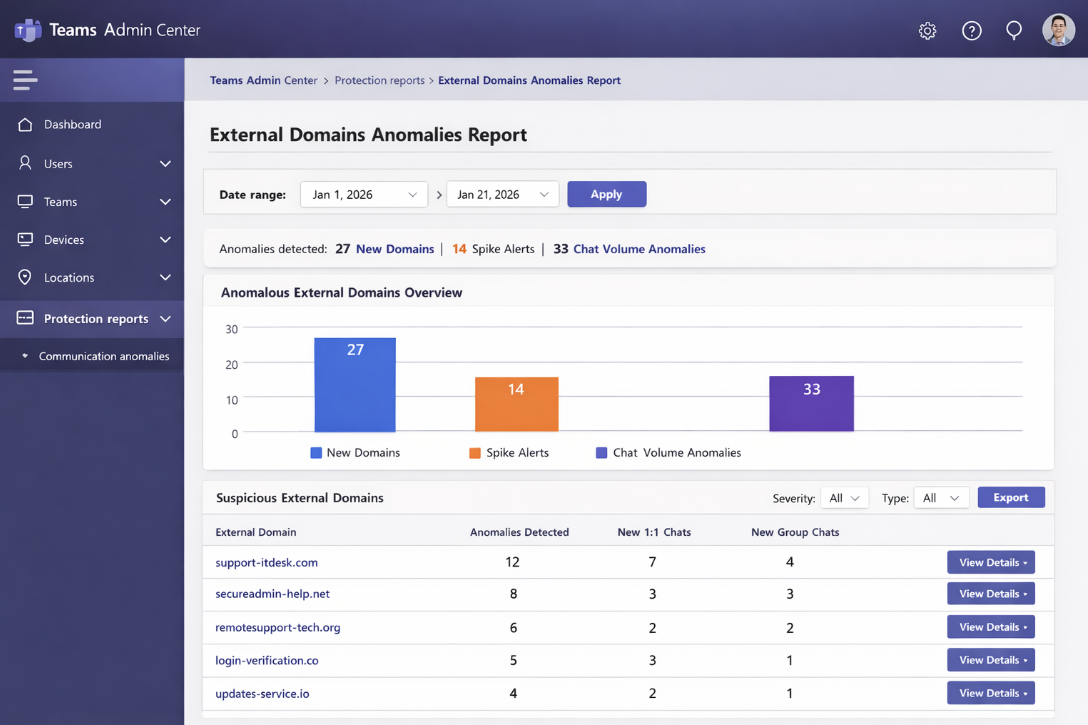
Microsoft is introducing a new Teams security capability called the External domains anomalies report, designed to help defenders spot suspicious external communication patterns before they turn into phishing, account takeover, or data exfiltration. The feature is listed under Roadmap ID 536572 and is expected to roll out globally starting February 2026, with broader availability “by March 2026,” initially for standard multi-tenant environments on Teams for the web.
This matters because attackers have increasingly shifted from email-only campaigns to Microsoft Teams-based social engineering, where a message can feel more “trusted,” more urgent, and harder for end users to challenge.
Why Microsoft built this: Teams is now a prime social engineering channel
Multiple threat reports show ransomware affiliates using Teams to impersonate internal IT support and push victims into installing remote control tools (RMM) such as AnyDesk or similar. Black Basta, for example, has been repeatedly linked to Teams-based lures after email bombing/spam waves.
Instead of waiting for a malware alert, Microsoft’s new report focuses on behavioral anomalies in cross-tenant messaging – exactly where many of these attacks begin.
What the External domains anomalies report detects
The report analyzes your tenant’s cross-organization Teams communication trends and highlights external domains that deviate from “normal” behavior. Microsoft describes the report as focusing on unusual or potentially risky interactions with external organizations, including:
The key anomaly patterns
- Sudden spikes in communication volume with an external domain
- First-time communication with a previously unseen external domain
- Abnormal engagement behavior, e.g., unexpected bursts of new chats/groups
What you’ll see in the report
Admins can run the report with a date range and review domains showing unusual activity, including:
- External domain name
- Total anomalies detected
- New 1:1 chat threads created by that domain
- New group chat threads created by that domain
Think of it as “early smoke detection” for Teams—often hours or days before a classic security alert would fire.
Where to find it in Teams Admin Center
Microsoft states the new report will be available in the Teams admin center under Protection reports. Admins can select Communication anomalies, choose a date range, and run the report to view results.
How to enable External Domain Anomalies alerts (important!)
To get proactive notifications (instead of only checking the report manually), you can enable alerting directly in Teams Admin Center:
Teams admin center → Notifications & alerts → Rules → External domain anomalies → Status: Active → choose a Teams channel for notifications
This creates a lightweight “SOC feed” inside Teams, allowing IT/Sec teams to triage suspicious external communication quickly.
How security teams should operationalize it
When an anomaly triggers, treat it like an investigation starter, not proof of compromise. A practical triage flow:
- Validate the external domain
- Is it a known partner? A brand-new supplier? A lookalike (typo-squatting)?
- Identify targeted users
- Which employees received first-contact messages or got pulled into new group chats?
- Hunt for “social-engineering intent”
- Messages claiming “IT support,” urgent password reset, MFA issues, invoice/payment changes, “security update required.”
- Check for follow-on behavior
- New remote tools installed, suspicious sign-ins, new OAuth consent, unusual file sharing.
- Contain fast
- Block external access if needed, reset compromised accounts, and alert impacted departments.
Build a layered defense: don’t rely on one control
External anomaly detection is powerful—but it works best alongside Teams’ newer built-in message protections:
- Malicious URL Protection warns users when links look dangerous inside Teams chats/channels.
- Weaponizable file type protection blocks high-risk file attachments (like executables) from being sent via Teams messages.
Microsoft is also moving toward “secure-by-default” messaging safety configurations in Teams, which increases baseline protection even for organizations that didn’t tune advanced settings.
Why this feature is a big deal (CISO summary)
The biggest shift in 2026 isn’t just “more ransomware” – it’s faster initial access through collaboration tools. The External domains anomalies report helps defenders see the earliest signs of a campaign:
- external domains suddenly targeting your users
- first-time cross-tenant contact patterns
- unusual chat creation bursts (classic pretexting stage)
In short: it helps you detect attackers before encryption, before exfiltration, before incident mode.