

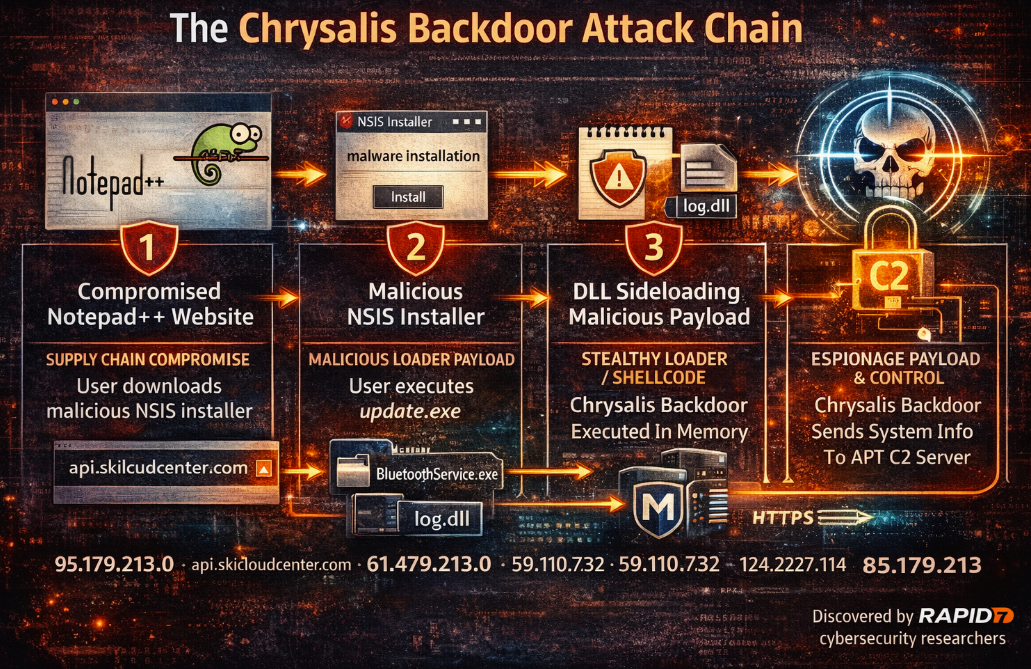
Rapid7 recently disclosed a sophisticated cyber-espionage campaign attributed to Lotus Blossom (also tracked as “Billbug”), an advanced persistent threat. The activity primarily targets high-value sectors: government, telecommunications, aviation, critical infrastructure, and media reflecting classic intelligence-driven objectives rather than opportunistic cybercrime.
The intrusion investigated by Rapid7’s MDR team originated from a compromise affecting infrastructure used to host Notepad++, where execution of notepad++.exe and GUP.exe preceded the launch of a suspicious update.exe downloaded from 95.179.213.0. While open reporting references plugin or updater abuse, Rapid7 highlights that definitive artifacts were not available to confirm the exact mechanism; what is confirmed is the downstream execution chain that led to a new, previously undocumented backdoor dubbed Chrysalis.
Technical Summary: From NSIS Installer to Custom Backdoor
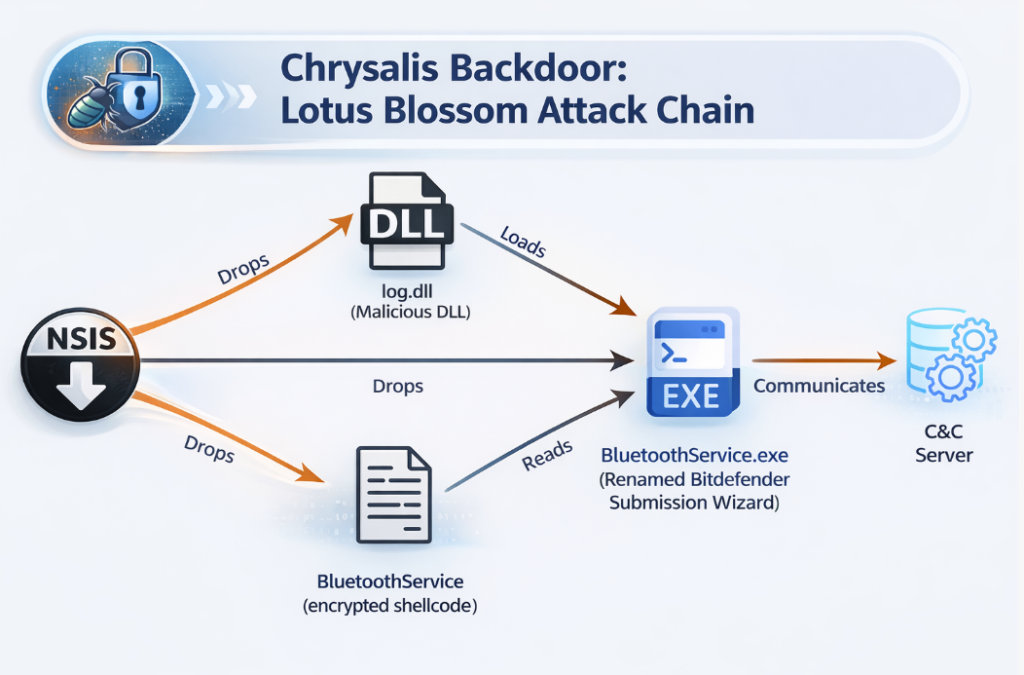
Rapid7’s analysis shows update.exe is an NSIS installer, a delivery format frequently used by Chinese APT groups to stage payloads. The installer drops components into a hidden %AppData%\Bluetooth directory and executes a renamed legitimate binary (BluetoothService.exe, a Bitdefender submission tool) to enable DLL sideloading of a malicious log.dll.
The sideloaded DLL provides two key exported functions (LogInit, LogWrite) responsible for loading encrypted shellcode into memory, decrypting it with a custom routine, resolving APIs dynamically via hashing, and transferring execution to the decrypted stage. That stage ultimately loads Chrysalis: a feature-rich, persistent implant designed for long-term access.
Chrysalis Capabilities and Tradecraft
Once active, Chrysalis demonstrates mature engineering and layered stealth:
- Multi-stage decryption (including reflective PE-like module loading and custom string obfuscation)
- Dynamic API resolution via hashing and PEB walking (reducing static indicators)
- Configuration encryption (RC4-based) with benign-looking user-agent strings
- C2 communications over HTTPS with URL patterns intended to resemble legitimate API traffic
-
A broad command set enabling:
- interactive reverse shell,
- remote process execution,
- file read/write and chunked transfers,
- directory enumeration and metadata collection,
- persistence via Windows services or registry run keys,
- self-removal and artifact cleanup.
Rapid7 also observed additional tooling on victim infrastructure, including a renamed Tiny C Compiler (TCC) and loaders consistent with a chain that retrieves a Cobalt Strike HTTPS beacon. Of particular note: a loader variant (ConsoleApplication2.exe) leveraged Microsoft Warbird—an obscure Microsoft internal protection mechanism—by abusing NtQuerySystemInformation parameters to achieve execution inside memory mapped to Microsoft-signed binaries. This is a strong signal of evolving stealth tradecraft and rapid adoption of public research by the adversary.
Indicators of Compromise (IoCs)
Network Indicators (as observed / published)
IP addresses
- 95.179.213.0
- 61.4.102.97
- 59.110.7.32
- 124.222.137.114
Domains
- api.skicloudcenter.com
- api.wiresguard.com
Microsoft 365 Defender Advanced Hunting Queries
1) File/Hash Hunt (SHA-256)
Use this query to identify file creation, modification, or presence for the published SHA-256 indicators:
DeviceFileEvents
 | where SHA256 in (
"a511be5164dc1122fb5a7daa3eef9467e43d8458425b15a640235796006590c9",
"8ea8b83645fba6e23d48075a0d3fc73ad2ba515b4536710cda4f1f232718f53e",
   "2da00de67720f5f13b17e9d985fe70f10f153da60c9ab1086fe58f069a156924",
   "77bfea78def679aa1117f569a35e8fd1542df21f7e00e27f192c907e61d63a2e",
   "3bdc4c0637591533f1d4198a72a33426c01f69bd2e15ceee547866f65e26b7ad",
   "9276594e73cda1c69b7d265b3f08dc8fa84bf2d6599086b9acc0bb3745146600",
   "f4d829739f2d6ba7e3ede83dad428a0ced1a703ec582fc73a4eee3df3704629a",
   "4a52570eeaf9d27722377865df312e295a7a23c3b6eb991944c2ecd707cc9906",
   "831e1ea13a1bd405f5bda2b9d8f2265f7b1db6c668dd2165ccc8a9c4c15ea7dd",
   "0a9b8df968df41920b6ff07785cbfebe8bda29e6b512c94a3b2a83d10014d2fd",
   "4c2ea8193f4a5db63b897a2d3ce127cc5d89687f380b97a1d91e0c8db542e4f8",
   "e7cd605568c38bd6e0aba31045e1633205d0598c607a855e2e1bca4cca1c6eda",
   "078a9e5c6c787e5532a7e728720cbafee9021bfec4a30e3c2be110748d7c43c5",
   "b4169a831292e245ebdffedd5820584d73b129411546e7d3eccf4663d5fc5be3",
   "7add554a98d3a99b319f2127688356c1283ed073a084805f14e33b4f6a6126fd",
   "fcc2765305bcd213b7558025b2039df2265c3e0b6401e4833123c461df2de51a"
 )
 | project Timestamp, DeviceName, FileName, FolderPath, SHA256, ActionType
 | order by Timestamp desc
2) Network Hunt (IPs + Domains)
Use this query to detect outbound connections to known infrastructure:
DeviceNetworkEvents
 | where RemoteIP in ("95.179.213.0","61.4.102.97","59.110.7.32","124.222.137.114")
    or RemoteUrl in ("api.skicloudcenter.com","api.wiresguard.com")
 | project Timestamp, DeviceName, InitiatingProcessAccountName, InitiatingProcessFileName, InitiatingProcessCommandLine,
           RemoteIP, RemoteUrl, RemotePort, Protocol, ActionType
 | order by Timestamp desc
Operational Guidance for SOC / CISO Teams
- Prioritize containment and forensic preservation if hits appear.
- If you find any IoC hits, pivot immediately to:
- process lineage (
DeviceProcessEvents) around Notepad++ / GUP.exe / update.exe, - persistence (
DeviceRegistryEvents, service creation), - suspicious
%AppData%hidden folder patterns (e.g., “Bluetooth”), - outbound HTTPS beaconing with common Chrome user-agents.
- process lineage (
- Consider adding these indicators into your allow/deny and detection logic (Defender custom detections, proxy/SWG, firewall egress rules), while watching for domain/IP rotation.